PureVPN Review
PureVPN is one of the oldest and largest VPN providers on the market.
From their humble 2-server beginnings, PureVPN has quickly expanded their operation and they now boast more than 2,000 servers across 180 different countries.
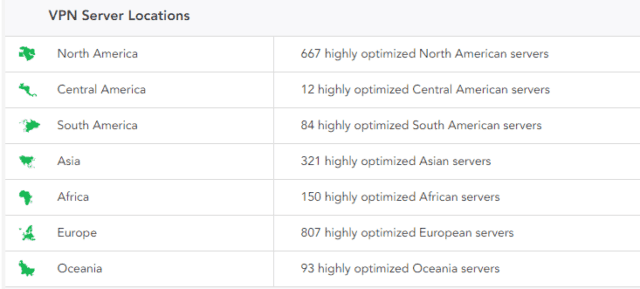
While they are headquartered in Hong Kong, which is an increasingly tumultuous jurisdiction for a VPN provider (largely due to their proximity and relationship with China) PureVPN manages and hosts their own network and DNS hardware which should mean that your information is more secure with them than with the average VPN.
Their services are compatible with all major devices including:
- Windows
- Android
- Mac
- iOS
- Linux
If you are particularly keen on optimizing your online protection, you can even set PureVPN up to work with your routers, smart TVs, browsers like Chrome and Firefox and streaming services (like Roku, Amazon Fire, and Chromecast)
They’ve recently introduced a ‘virtual router’ feature to Windows devices, which means you can empower a Windows desktop or laptop with ‘router’-like features to connect up to 10 different devices.
Some VPN services, like VyprVPN for example, will only limit you to two different simultaneous connections. So the fact that you can connect PureVPN to a real router, in addition to setting up a ‘virtual router’, means you can connect TONS of different devices. (Probably more than you’d ever want or need, anyway.)
They also have a ‘split-tunneling’ feature which means you can choose how (and where) you’d like to send traffic – through your VPN or internet service provider as usual. So your data can be split as needed.
While PureVPN doesn’t offer their own TOR, you can use one on top. Combining VPN’s with the Tor network to add an additional layer of privacy and security.
PureVPN has a kill switch feature that works like a fail-safe. The goal is to make sure your privacy and anonymity are never compromised, and that your personal information is never divulged.
Last but certainly not least, PureVPN comes with the NAT Firewall add-on so that all possible hacking loopholes are secured.
Pros of using PureVPN
1. Supports All Major Protocols (OpenVPN, IPSec, L2TP …)
‘Man-in-the-middle’ (MiTM) attacks are some of the oldest (and most common) ways that hackers gain access to your sensitive information.
You might not even sense anything is wrong. But somehow, someway, someone has placed themselves between you and your intended connection (like a browser or a website).
They can then read your emails, see what websites you’re going to, grab your session cookies to fool different websites into thinking they’re you, and even get personal information or passwords.
Many times the very tools used to help intercept these practices, like WiFi Pineapple, can be used to perform them by anyone, anywhere. Like, sitting in your local coffee shop for instance. Now, browsing emails or booking a flight while sipping a latte can turn out to be not such a relaxing afternoon after all.
This potential risk now extends to mobile devices, apps, and even your smart devices too.
To combat these problems, PureVPN offers all major protocols, including OpenVPN, L2TP/IPSec, PPTP, SSTP, and even IKEv2.
While OpenVPN is your best bet to get both benefits from security and speed, you might also need to choose L2TP/IPSec based on device availability or PPTP (in only a few certain cases where you’re not as worried about security vulnerabilities).
2. Industry Standard 256-bit Encryption
Brute force attacks are another unfortunately common practice.
Hackers eventually figure out your passwords and pin numbers through a series of repetitive, lightning-fast, trial-and-error combinations.
They’re one of the oldest tricks in the book (besides simply guessing your spouse’s birthday or kids name). And they’re actually increasing.
For example, a recent wide-spread attack on WordPress sites has been directed by a Russian company being used by the country to launch cyber attacks (you can’t make this stuff up).
The best form of defense in this case, is prevention. That comes in the form of 256-bit encryption, which is one of the most secure connections possible used by government agencies around the world.
Your encrypted tunnel gets sealed shut so that third-party sites, ISPs, and nefarious, shadowy organizations worthy of being the next Bond villain, can’t see what you’re up to.
In addition, your privacy and anonymity is completely safe by their ‘end-to-end’ connection. This includes when you switch from one IP to another (or another, or another) across PureVPN’s 80,000+ options.
3. Some Pretty Cool Features (When they Work)
One of the few things that I really liked about PureVPN is just how many features and options they offer their users.
For starters, they offer a kill switch, five simultaneous connections, support for all major protocols, DDoS protection, advanced port forwarding, split tunneling, and a NAT Firewall.
In fact, they provide such a plethora of ways to optimize and customize your VPN experience that it would make even the best VPN blush.
Well…
It would if all of these features worked all the time.
However, they don’t.
I personally experienced a killswitch failure and, after reviewing a number of forums and third-party reviews, realized that almost every customer has experienced some type of issue with one or more of the features that PureVPN offers.
But they work most of the time so I suppose this is technically still a “Pro.”
4. Unrestricted Torrenting
PureVPN is solidly pro-torrenting.
Why’s that noteworthy?
Because ever since copyright infringement lawsuits have began flooding the marketplace, more and more VPNs are shying away from P2P servers.
Often, the ones who do still offer torrenting-friendly servers only allow it on a small handful.
But PureVPN doesn’t have any of these restrictions.
You’re free to use torrenting on any of their servers. So download away!
Cons of using PureVPN
PureVPN is kind of like that kid in high school who slid by with all A’s but never actually did much to earn them. It looks great on paper but sucks in the real world.
Sure, their services are affordable, they have some cool features and a great selection of servers. But the paltry “Pros” I’ve discussed so far simply cannot outweigh the massive list of “Cons”.
1. Atrociously-Slow Download Speed
Here’s a speed test I ran on speedtest.net to ensure the accuracy of this review.
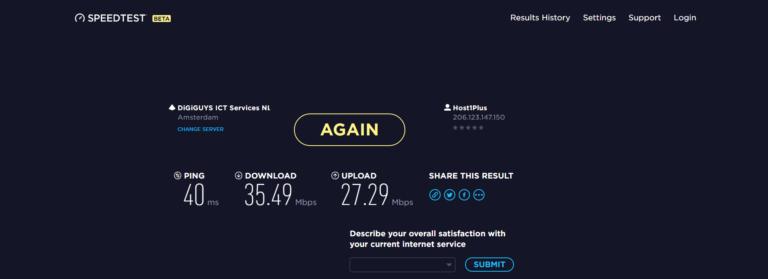
US Server (New York)
- Ping: 125ms
- Download: 29.41 Mbps
- Upload: 29.06 Mbps
EU Server (Amsterdam)
- Ping: 40ms
- Download: 35.49 Mbps
- Upload: 27.29 Mbps
Asia Server (Hong Kong)
- Ping: 355ms
- Download: 6.77 Mbps
- Upload: 3.62 Mbps
UK Server (London)
- Ping: 53ms
- Download: 62.48 Mbps
- Upload: 45.90 Mbps
Ironically, the slowest server that I tested was actually the server where the company is headquartered!
But things weren’t too great on the “faster” servers either.
Their Amsterdam server (the fastest that I could find) only topped out at 35 Mbps out of 100.
Considering that their top competitor, PIA, offers servers with more than double the download speed at a very similar price, I can promise you that no one will be buying PureVPN for their “blazing-fast browsing and streaming experience” anytime soon.
2. DNS, IPv4, and IPv6 Leaks
When you are in the market for a VPN, you are typically there for one reason and one reason only.
Security.
Whether you want to protect yourself when working from public wi-fi or bypass censorship laws in your country, personal, security is (and should be) your primary concern when selecting a new VPN service.
Unfortunately for PureVPN, their service simply isn’t up to the task of anonymizing your internet experience.
I found countless instances of disgruntled customers who noticed that their DNS and personal IP address was being leaked while using Pure VPN’s services.
I decided to ask one of their customer service reps about the alleged issues.
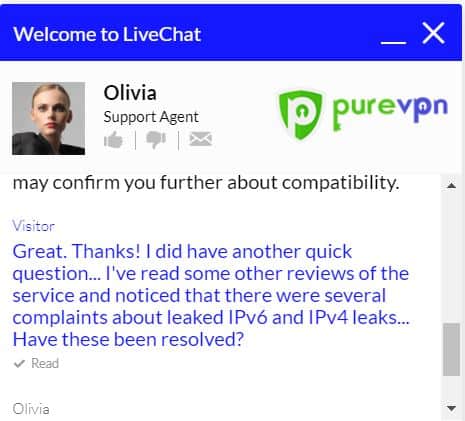 Here’s how they responded.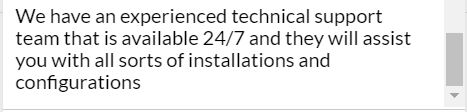
While this response sounded oddly like an automated chat software and not a live representative (which I will touch on shortly), it also didn’t answer my question.
So, I inquired further and received the following response.
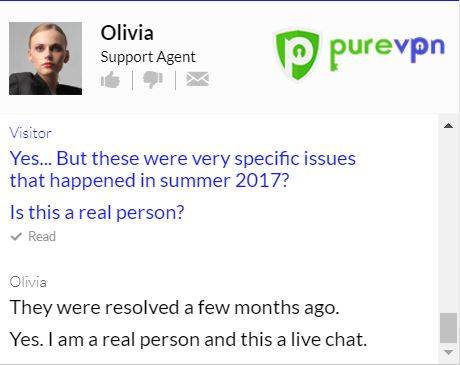
Even if you completely ignore the ambiguous response, PureVPN, or at least their “Highly trained representative” blatantly lied to one of their customers.
Even though they allegedly resolved these issues “A few months ago“, I found several reviews and customer complaints from September 2017 with screenshots and testimonials proving otherwise.
So…
If you are concerned about your security, you should probably find another VPN provider like ExpressVPN.
3. Their No Logs Policy Isn’t Completely True
At this point in the review, you are probably starting to see a theme.
PureVPN loves to make big promises.
But for some reason, they don’t see fit to actually keep any of those promises.
This is true with their privacy protection and a 7-day money back guarantee, and it’s true with their logging policy as well.
One the surface, PureVPN markets their product as a “Zero Logs” VPN.
However, if you read the fine print you will quickly realize that this simply isn’t the case.
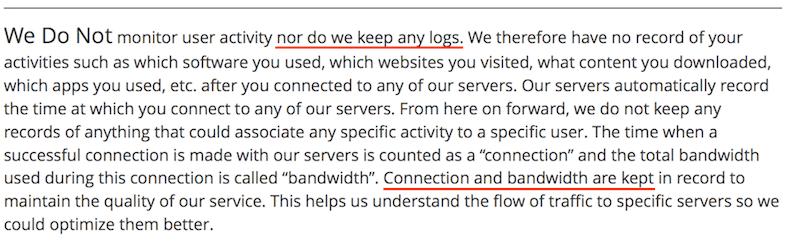
So they don’t keep any logs BUT they do keep a record (a.k.a. a “Log”) of your connection and bandwidth?
If you are a little bit confused by this oxymoronic policy, you are not alone.
I don’t always mind if a VPN company keeps certain logs in order to continually improve and optimize their service.
But I do take an issue with a company that advertises zero logging and then blatantly keeps logs of your activity (which of course, you wouldn’t know unless you read the fine print).
4. Terrible Customer Service
As you probably discerned from my previous points, I am not a big fan of PureVPN’s “24/7 Live Customer Service.”
While reviewing PureVPN, I decided to give them the benefit of the doubt and came back to their website several hours after my initial query to see if another agent could help answer my question.
And here’s what I received from their so-called “Live Chat”.
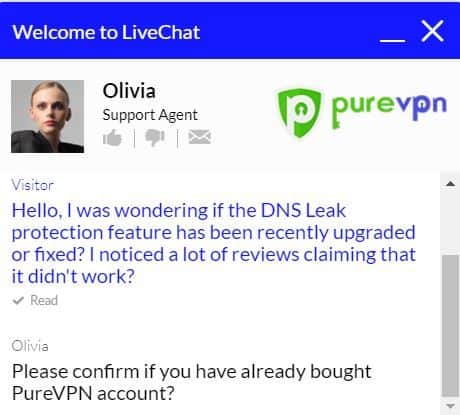
It seemed odd to me that my support agent would need to know whether or not I had a PureVPN account in order to answer this question, so I dug a little deeper.
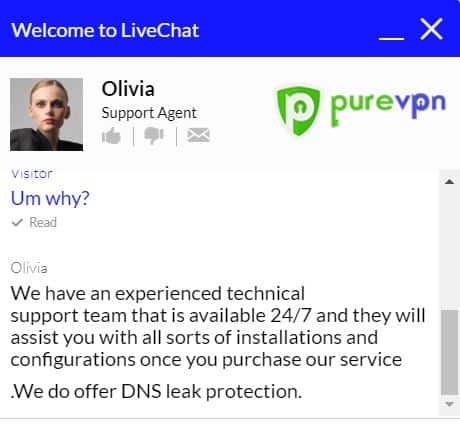
Not only did they completely ignore the question that I originally asked, they were, yet again, caught in a blatant lie.
The company advertises live support agents and over the course of my previous correspondence, they expressly claimed I was speaking with an actual person.
Which left me with one of two conclusions.
Either PureVPN uses an automated chat service and expressly lies to potential customers.
Or…
They have some of the most poorly trained agents in the entire industry.
Either way, things aren’t looking too good for them.
5. Deceptive Advertising Practices
Nearly every ‘Con’ that I have discussed over the course of this review comes back to one thing…
False advertising.
When it all came down to it, the repeated pattern of lying to their customers is what really ruined PureVPN for me.
If you bring enough to the table, I can overlook lackluster speeds, I can overlook mediocre customer service, and I can even overlook a slightly bloated price tag.
But what I can’t and won’t overlook is a company that makes a habit of deceiving and misleading their customers.
- PureVPN claims that they keep no logs… They do.
- They claim to have 24/7 live customer service agents… They clearly don’t (or if they do, they are the most robotic agents I’ve ever encountered).
- They claim to protect your DNS and IP Address… But countless third-party reviews and customer complaints clearly show these services rarely work.
- They make claim after claim that they simply cannot backup and for me, that’s the biggest deal breaker there is.
If I am going to trust a company with my personal data, my hard earned money, and, in some instances, my personal security, then I want to be sure that the company in question is above reproach.
And PureVPN just isn’t.
6. Zero Netflix Servers Worked Properly
PureVPN claims to work with Netflix.
But unfortunately, these claims didn’t hold up in our tests.
All four of the following PureVPN servers were blocked:
- United States
- Canada
- United Kingdom
- Netherlands
Usually, we can get at least one or two servers to work. So the fact that none of them did, unfortunately, places PureVPN towards the bottom of our Netflix-friendly VPN list.
Pricing, Facts & Hidden Clauses
The first, and possibly most noticeable ‘pro’ about using PureVPN is the price tag.
They’re still one of the cheapest VPNs on the market and offer a phenomenal price for customers on their 1-year plan.
Here’s how it all breaks down.
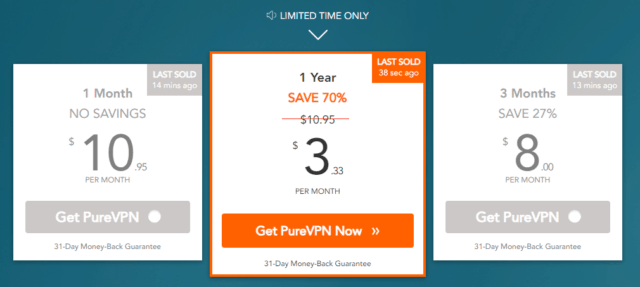
Month-to-Month Plan
- $10.95 per month
- 0% Savings
3 Months Plan
- $8.00 per month
- 27% Savings
One Year Plan
- $3.33 per month
- 70% Savings
They also allow customers to purchase their service with almost every payment method imaginable (even Target gift cards)
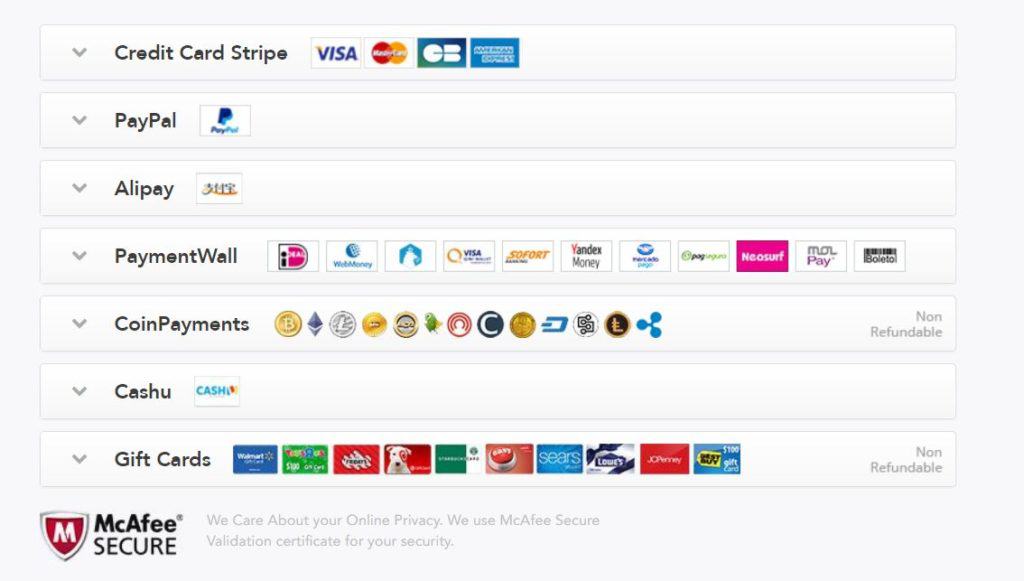
In addition to their budget-friendly pricing and wide array of payment options, all of their purchases come with a 31-day money back guarantee.


Post a Comment